
What Is YouTube ReVanced?
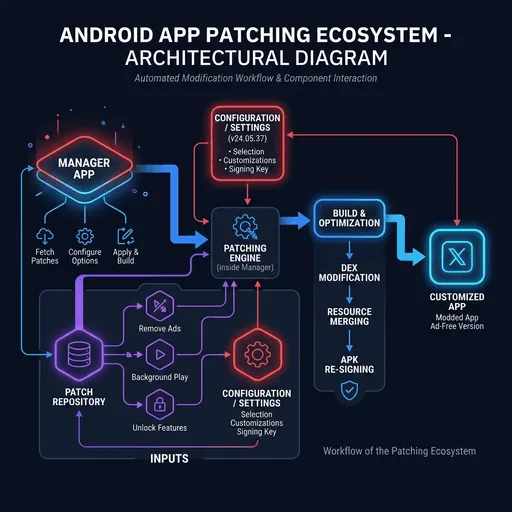
ReVanced is a community project that maintains an open-source framework for patching Android apps. YouTube is by far its most common target, which is why the patched result usually gets called YouTube ReVanced, though the same system works on other apps too.
The project continues the idea behind Vanced with a different mechanism. Vanced distributed a prebuilt modified APK. ReVanced distributes patches and a Manager app; you supply the base YouTube APK, and the Manager builds the patched app on your phone.
ReVanced vs YouTube Vanced
The main differences:
- Vanced was a complete modified app; ReVanced is a patching tool
- Vanced was discontinued; ReVanced is still maintained
- ReVanced lets you choose which modifications to apply
- ReVanced needs you to supply the base YouTube APK
What Is ReVanced Manager?
ReVanced Manager is the app that runs the patching process. You pick the target app, choose your patches, set any patch options, and the Manager builds and installs the result. Without it, patching would mean command-line tools.
ReVanced Manager GuideWhat Are ReVanced Patches?
Patches are individual modifications applied to a supported app. The most used ones:
- Ad removal - hides video and banner advertisements
- Background playback - keeps audio running with the screen off
- SponsorBlock - skips sponsored segments in videos
- Return YouTube Dislike - restores dislike counts
- Themes - dark and AMOLED options
- Playback settings - overrides for quality, speed, and codecs
You decide which patches go into your build. That flexibility is something Vanced never had.
ReVanced and MicroG / GmsCore
Non-root installs need a companion app called GmsCore, known as MicroG back in the Vanced days. It handles Google sign-in and push notifications so the patched app works without full Google Play Services or root access.
ReVanced for YouTube Music
The patch set also covers YouTube Music, the successor to the old YouTube Music Vanced. Music needs its own patching pass; it is not included when you patch YouTube.
Common YouTube ReVanced Issues
The problems that come up most often:
| Issue | Common Cause | Status |
|---|---|---|
| Patch failed | Unsupported app version | Check supported versions |
| Manager crashing | Outdated Manager version | Update Manager |
| Login problems | GmsCore not installed | Install GmsCore |
| Playback errors | Missing patches or version mismatch | Re-patch with correct version |
| App not installed | Signature conflict | Uninstall old version first |
Safety Checklist
- Get ReVanced Manager only from the official GitHub repositories
- Ignore prebuilt "ReVanced APKs" from unknown sources
- Verify file hashes when possible
- Read the official documentation before patching
- Keep Manager and GmsCore updated
YouTube ReVanced Pros & Cons
✅ ReVanced Pros
- Actively maintained, with regular patch updates
- Open source, with the full code on GitHub
- You choose exactly which patches to apply
- Ad blocking, SponsorBlock, and background play included
- Supports YouTube, YouTube Music, and other apps
- No root required (GmsCore covers sign-in)
- Active community on Reddit and Discord
- Patches get updated for new YouTube versions
⚠️ ReVanced Cons
- More setup than old Vanced, since you patch it yourself
- Violates YouTube's Terms of Service
- YouTube updates can break things until you re-patch
- Needs a specific base YouTube APK version
- No iOS version
- GmsCore required for Google sign-in without root
- Google could apply legal pressure in the future
- Not on the Google Play Store
Frequently Asked Questions
No. Vanced was a prebuilt modified app that is no longer maintained. ReVanced is a separate project built around patching. Read the full comparison.
No. Non-root installs work with GmsCore handling Google account features. Root is optional.
The source code is public on GitHub, so anyone can audit it. Get it from official sources only, and skip prebuilt APKs from unknown websites. Read our safety guide.
No. ReVanced targets Android only. There is no iOS version.
Yes. The Manager, the patches, and everything around them are free and open source.
Using it violates YouTube's Terms of Service, which is not the same as being illegal. In most jurisdictions the legal exposure sits with developers rather than users, and Google has not taken action against people for using it. See our disclaimer.
Open ReVanced Manager, check for patch updates, download the supported YouTube APK version, and re-patch. The Manager walks you through most of it.
From the official ReVanced GitHub repository or revanced.app, nowhere else. See our official sources guide.