
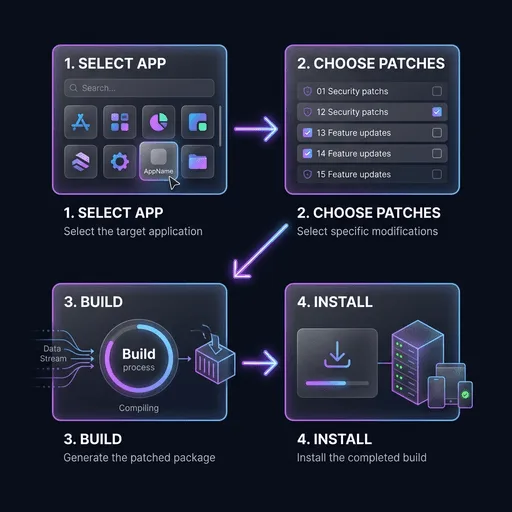
What ReVanced Manager Does
The Manager is an Android app that puts a graphical interface on the patching process. Instead of command-line tools, you get a workflow that lets you:
- Select a base application (YouTube, for example) to patch
- Choose which patches to apply
- Configure patch-specific options
- Build and install the patched app
- Keep both the Manager and the patches updated
Local Patching vs Prebuilt APKs
The distinction matters: the Manager patches apps locally on your device. It does not download prebuilt modified APKs. Any website offering a "prebuilt ReVanced APK" is working outside the official model and deserves suspicion.
| Approach | ReVanced Manager (Official) | Prebuilt APKs (Unofficial) |
|---|---|---|
| How it works | Patches locally on device | Downloads pre-modified app |
| Transparency | Source code available | Unknown modifications |
| Customization | Choose patches | Fixed configuration |
| Trust level | Verifiable through GitHub | Depends on source |
Patches and Supported Apps
Patches target specific app versions, and using an unsupported version is the most common reason patching fails. The Manager shows which versions each app supports.
Root vs Non-Root
Both setups work:
- Non-root: the patched app installs alongside the original and needs GmsCore for Google account features.
- Root: the patched app replaces the original through Magisk or similar tools. GmsCore is not needed.
GmsCore (MicroG) Basics
For non-root users, GmsCore handles Google sign-in and push notifications. It replaced what the Vanced ecosystem called "MicroG". Without it, a non-root install cannot sign in to a Google account inside the patched app.
Common Errors
| Error | Likely Cause | Solution |
|---|---|---|
| Patch failed | Unsupported app version | Use the recommended version |
| Manager crash | Outdated Manager | Update to the latest release |
| App not installed | Signature conflict | Uninstall the original app first |
| Login loop | Missing GmsCore | Install GmsCore for non-root |
Safety Checklist
- Download the Manager only from official ReVanced GitHub releases
- Skip third-party websites offering "Manager downloads"
- Verify the APK signature against official releases
- Keep the app updated for security and compatibility
Frequently Asked Questions
No. Vanced Manager installed a prebuilt app. The ReVanced version patches apps locally on your device using whichever patches you select.
The official model is patching through the Manager. Prebuilt APKs from unknown sources are unofficial and carry real security risk.
Patches are written for specific YouTube versions. Use the version the app recommends.
Yes, for non-root installs. GmsCore handles Google sign-in. Root users rely on the device's own Google services.
Only from the official ReVanced GitHub repositories. Third-party download sites are not vetted by anyone.